Ground Modes
A Grove chooses the visual ground in which its whole local site lives.
- soil — the default
- forest-floor — earthy inverse
- one coordinated token set

Ground is an authored editorial property of the Grove, not browser dark mode and not a user preference. There are exactly two governed Grounds. Soil is the existing warm-paper Musewoods environment and the default — every Grove that authors no Ground, including this one, renders on Soil exactly as before. Forest Floor is an earthy inverse analytical environment. This page is Soil; it renders a representative composition so it can be compared, section for section, against the Forest Floor Laboratory, which renders the equivalent composition on Forest Floor.
How It Resolves
The resolver in lib/groves/ground.mjs normalises manifest.ground into a Ground id on the server, so the correct Ground is in the first byte of HTML — there is no flash from Soil to Forest Floor on load. The Grove shell carries the resolved id as data-ground on its one bounded root.
Beneath that boundary, Ground resolves to a coordinated token set: typography, surfaces, rules, links, focus, and the paired analytical surface for D3 and Mermaid all move together. A component reads semantic tokens and follows; it never branches on the Ground name. Nothing about the Ground leaks past the Grove root — Stories, Journals, Viewgraphs, and every other Grove are untouched.
The Processing Pipeline
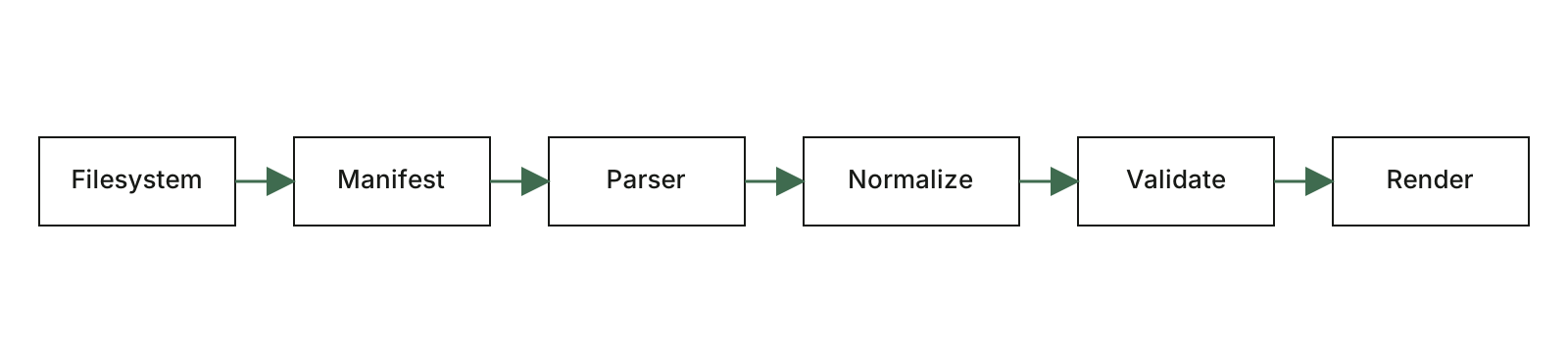
On Soil, an authored SVG sits in a light figure well. On Forest Floor, the same SVG sits in a dark figure well — but the artifact itself is never darkened, inverted, or filtered. Musewoods governs presentation; authored artifacts keep their identity on both Grounds.
A Diagram, In The Ground
On Soil, this Mermaid diagram renders on the ordinary light analytical surface. On Forest Floor, it renders on the canonical Inverse surface — dark-forest node, warm ivory label, mineral rule — the same grammar a Viewgraph uses, not a second dark theme.
Figure 1
Rendering diagram…
An Update, As A Feature Band
The shared motif layer is Ground-aware
feature-band, quote-panel, and reel read the Ground contract. Only the surrounding text, rule, and link environment is re-toned; the authored image is never placed in a glowing card.
A Founder Voice, Attributed
The point was never a darker website. It was a place inside Musewoods where dense analytical work feels like it belongs.
 A Grove authorMusewoods Press
A Field Statement, Unattributed
A Ground is chosen, not toggled. It says where the idea lives, and the whole local site lives there with it.
Field Observations, As An Image Reel
The reel viewport, controls, position counter, and captions follow the Ground; the authored images do not.
First observation.
A Referenced Viewgraph, As A Reel
Reel reference
Where the pattern begins
A title frame, reused whole inside a Reel viewport.
The Reel viewport and controls follow the Ground. The referenced Viewgraph frame keeps its own presentation contract on both Grounds — Ground stops at the viewport.
When To Choose Which
Choose Soil when prose dominates
A quieter, more literary Grove, imagery that benefits from a light editorial ground, or a Grove that should feel continuous with Musewoods itself.
Choose Forest Floor when analysis dominates
Dense graphs, networks, and evidence exploration; a Grove that should feel immersive; a darker earthy environment that strengthens the identity.
Forest Floor is not automatically better for technical topics
It is an editorial choice, not a default for anything. A prose-led technical Grove is often better on Soil.